 Proudly Canadian-Owned
Level Up Your Setup: Choosing the Best Gaming Monitor for Your Rig
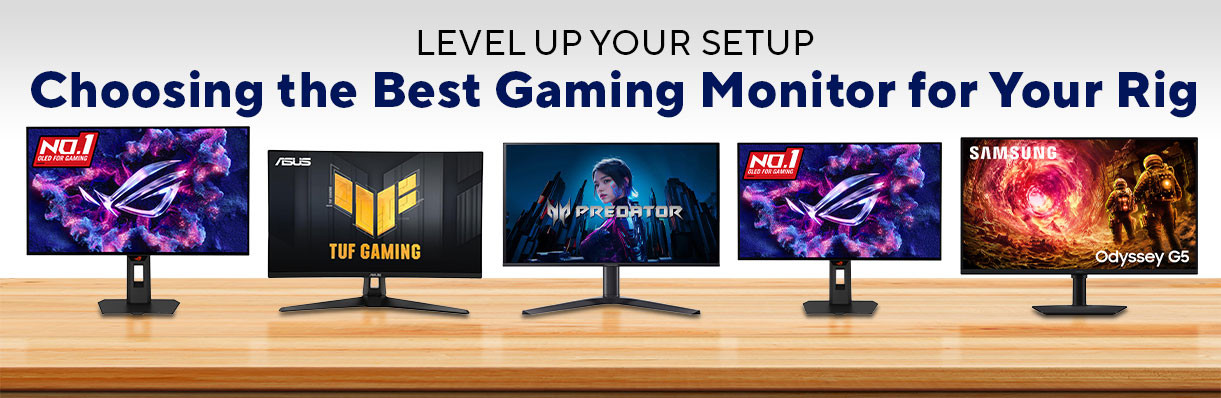
Upgrading your gaming rig is exciting, but picking a monitor isn’t as simple as choosing a screen size. Today's displays are packed with a confusing alphabet soup of specs—like IPS, OLED, Hz, and MS—that can make your head spin before you even launch a game.
That being said, here are five heavy hitters for you to consider. From budget-friendly speed demons to premium 4K OLED masterpieces, let’s find out which display deserves a permanent spot on your desk.
Quick Comparison:
| Monitor Model | Size & Resolution | Panel Type | Max Refresh Rate | Response Time | Best For |
|---|---|---|---|---|---|
| Asus TUF VG27AQ5A | 27" QHD (1440p) | Fast IPS | 210Hz | 0.3ms (min) | Budget-conscious competitive players |
| Acer Predator X27 (UM.GXXAA.103) | 27" QHD (1440p) | QD-OLED | 280Hz | 0.03ms | Ultra-fast Esports & vibrant colors |
| Samsung Odyssey G50F | 32" QHD (1440p) | Fast IPS | 180Hz | 1ms | Big-screen immersion on a budget |
| Asus ROG Strix XG27AQDMGR | 26.5" QHD (1440p) | W-OLED | 240Hz | 0.03ms | Premium, Smooth, Competitive gaming |
| Asus ROG Strix XG32UCWMG | 31.5" UHD (4K) | W-OLED | 240Hz | 0.03ms | The ultimate cinematic & next-gen setup |
The Heavy Hitters:
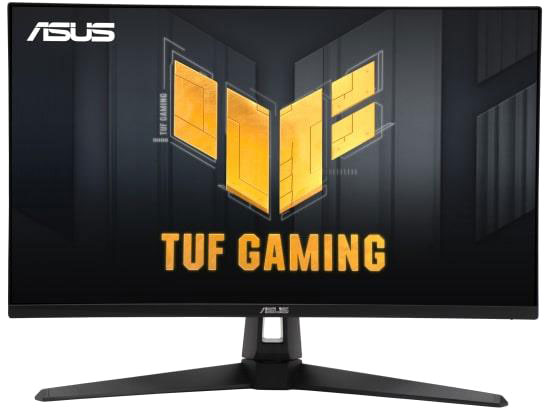
1. ASUS TUF Gaming 27" (VG27AQ5A)
The Sweet-Spot Value King
If you want a reliable, high-performing monitor without breaking the bank, the Asus TUF VG27AQ5A is a fantastic place to start.
- The Breakdown: This monitor hits the "sweet spot" for modern PC gaming: 27 inches paired with a crisp 1440p (QHD) resolution. Since it uses a Fast IPS panel, you get great viewing angles and vibrant colors without the nasty motion blur that used to plague older displays.
- Performance: Asus pushed this panel to a snappy 210Hz refresh rate. Combined with an incredibly low 0.3ms minimum response time and AMD FreeSync Premium, screen tearing is essentially non-existent.
- The Catch: It relies on older HDMI 2.0 ports. While the DisplayPort 1.4 connection will let your PC run at full speed, console gamers (PS5/Xbox Series X) won't be able to hit 4K downscaling or 120Hz VRR as seamlessly as they would on HDMI 2.1.
The Verdict: An absolute sweet spot for PC gamers who want high-tier speed and solid colors without the premium price tag.
FREQUENTLY ASKED QUESTIONS
- Q: Can I achieve the full 210Hz refresh rate on a PlayStation 5 or Xbox Series X?
- A: No, you won't reach 210Hz on a console. The 210Hz refresh rate is an overclocked setting exclusive to PC connections via the DisplayPort. Furthermore, because this monitor features HDMI 2.0 ports rather than HDMI 2.1, next-gen consoles will max out at 1440p at 120Hz.
- Q. What is ASUS ELMB Sync, and should I turn it on?
- A: ELMB Sync (Extreme Low Motion Blur Sync) is a specialized Asus technology that reduces motion blur by strobing the backlight. What makes it special here is that it can run simultaneously with FreeSync/Adaptive-Sync. You should turn it on if you play fast-paced, competitive shooters and want maximum image sharpness during rapid camera movements.

2. Acer Predator X27 27" (UM.GXXAA.103)
The Vibrant Speed Demon
Moving from standard IPS panels to OLED technology is like putting on glasses for the first time. The Acer Predator X27 takes it a step further by using a Quantum Dot OLED (QD-OLED) panel.
- The Breakdown: QD-OLED technology combines the perfect, infinite contrast ratios of OLED (where black pixels completely turn off) with the mind-blowing brightness and color saturation of Quantum Dots. Neon signs in games like Cyberpunk 2077 practically pop off the screen.
- Performance: At 280Hz and a near-instantaneous 0.03ms response time, this is a competitive gamer's dream. It reacts faster than humanly possible, ensuring your crosshairs track perfectly. It also features HDMI 2.1, making it fully compatible with next-gen consoles.
- The Catch: OLED monitors require a bit of mindfulness to avoid permanent image retention (burn-in), though modern pixel-shifting tech helps mitigate this.
The Verdict: If you have the budget and want the absolute best blend of competitive speed and gorgeous, saturated colors at 1440p, this is it.
FREQUENTLY ASKED QUESTIONS
- Q: What makes the QD-OLED panel on this monitor different from a standard OLED?
- A: Standard OLEDs excel at deep blacks but can sometimes look slightly dim. By adding a layer of Quantum Dots (QD), this Acer display achieves much higher peak brightness and noticeably more vibrant, saturated color volumes—making colors look incredibly punchy even in well-lit rooms.
- Q. Does the 280Hz refresh rate work automatically out of the box?
- A: To hit the native 280Hz, you need to use a DisplayPort 1.4 connection hooked up to a capable PC graphics card. If you are connecting a next-gen console via its HDMI 2.1 ports, the monitor will automatically adjust to scale perfectly to the console’s maximum 120Hz output.
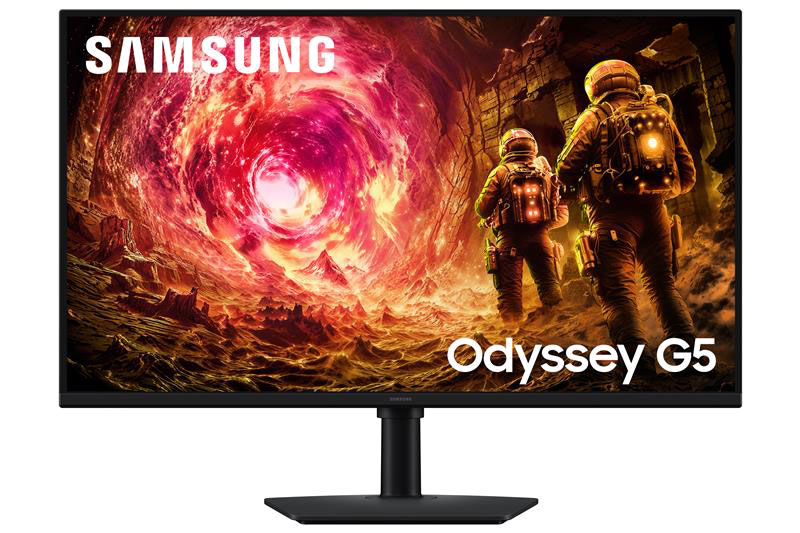
3. Samsung Odyssey G50F 32" (LS32FG502ENXZA)
The Budget-Friendly Giant
Newsflash, size matters, with gaming monitors at least. If you prefer sitting back with a controller or want your games to fill your peripheral vision, a 32-inch monitor is incredibly immersive. The Samsung Odyssey G50F offers that massive estate without a massive price.
- The Breakdown: This is a flat 32-inch Fast IPS monitor running at 1440p. It provides beautiful color reproduction and great viewing angles, ensuring an enjoyable experience whether you're gaming or streaming movies.
- Performance: A 180Hz refresh rate and 1ms response time ensure smooth gameplay. It is also both FreeSync and G-Sync compatible, giving you flexible anti-tearing support no matter your graphics card.
- The Catch: At 32 inches, 1440p resolution is stretched a bit thin compared to a 27-inch screen. Text won't look quite as sharp up close, and its ports (HDMI 2.0 and DisplayPort 1.2) are a generation behind.
The Verdict: Perfect for gamers who want a massive, vibrant display for casual or cinematic gaming without spending a fortune.
FREQUENTLY ASKED QUESTIONS
- Q: Is 1440p resolution high enough for a screen as large as 32 inches?
- A: For gaming and watching videos, it looks great and gives you an incredibly immersive, large field of view. However, because the pixels are stretched over a larger area than a 27-inch screen, text might look slightly less sharp if you sit very close to the monitor while doing office work.
- Q. Does this monitor include built-in speakers?
- A: No, the Odyssey G50F does not have built-in speakers. To get audio, you will need to plug your headphones or external desktop speakers directly into the built-in 3.5mm headphone jack on the back of the panel.

4. ASUS ROG Strix 26.5" (XG27AQDMGR)
The Premium Esports Experience
If you love the idea of an OLED panel but want the elite build quality, styling, and cooling features of the Republic of Gamers (ROG) line, the Asus ROG Strix XG27AQDMGR is a masterpiece.
- The Breakdown: This monitor features a W-OLED panel, which leans toward incredibly deep, ink-like blacks and exceptionally clear text. Asus added a custom heatsink inside to keep the panel cool, which extends the monitor’s lifespan and safely allows for higher peak brightness.
- Performance: Running at 1440p with a 240Hz refresh rate and 0.03ms response time, motion clarity here is flawless. It supports AMD FreeSync Premium Pro and NVIDIA G-Sync, delivering silky-smooth performance.
- The Catch: Like the Acer, it commands a premium price, and the 26.5-inch footprint might feel just a tiny bit smaller if you are used to larger displays.
The Verdict: Built like a tank with pro-grade performance. It's the ultimate premium 1440p companion for hardcore PC players.
FREQUENTLY ASKED QUESTIONS
- Q: How does this monitor protect itself against permanent OLED burn-in?
- A: Asus built this monitor with their custom "OLED Care Pro" suite. It features a heavy-duty internal custom heatsink to pull heat away from the pixels, alongside automated software features like screen shifting, static logo dimming, and taskbar detection to safely prolong the life of the panel.
- Q. Is there a noticeable difference between the 0.03ms response time on this OLED versus a 1ms IPS monitor?
- A: Yes, the difference is night and day. OLED pixels change color almost instantly (0.03ms), which completely eliminates the trailing or "ghosting" effects you sometimes see behind fast-moving objects on even the best 1ms Fast IPS screens.

5. ASUS ROG Strix 31.5" (XG32UCWMG)
The “No-Compromise” Choice
For the ultimate gaming setup, look no further than the Asus ROG Strix XG32UCWMG. This monitor combines the best of all worlds: massive size, maximum resolution, and elite panel technology.
- The Breakdown: This luxury 31.5-inch display features a breathtaking 4K UHD (3840 x 2160) TrueBlack Glossy W-OLED panel. The glossy finish gives the screen an extra layer of clarity and perceived contrast that matte monitors just can't match.
- Performance: It delivers a 240Hz refresh rate at 4K. Remarkably, it features a "Dual Mode" that allows you to instantly switch to 1080p at a blistering 480Hz for intense competitive shooters. It's fully loaded with dual HDMI 2.1 ports, DisplayPort 1.4, and a USB-C port that handles video and peripheral switching via an unbuilt KVM.
- The Catch: To run demanding games at 4K and high frame rates, you will need an equally high-end graphics card. It is also a significant financial investment.
The Verdict: The undisputed endgame monitor. If you want a future-proof display for a high-end PC and next-gen consoles, this is the crown jewel.
FREQUENTLY ASKED QUESTIONS
- Q: What is the "Dual Mode" feature, and how do I use it?
- A: Dual Mode allows the monitor to act as two displays in one. With a quick hotkey press, you can swap between a cinematic 4K resolution at 240Hz (ideal for gorgeous RPGs) and a blistering 1080p resolution at 480Hz (optimized for hardcore, competitive Esports where frame rate is everything).
- Q. Does this monitor support a KVM switch, and what does it do?
- A: Yes, it features an Auto KVM switch. This allows you to plug your keyboard and mouse directly into the monitor's USB ports and seamlessly control two separate devices (like a high-end gaming PC and a work laptop or ROG Ally handheld) using just the one mouse and keyboard setup.
Which One Is For You?
Choosing the right monitor comes down to your budget and what games fill your library:
- Choose the Asus TUF VG27AQ5A if you want the best performance-to-price ratio for competitive PC gaming.
- Choose the Acer Predator X27 if you want the absolute fastest, most color-vibrant 1440p experience available.
- Choose the Samsung Odyssey G50F if you love big screens and cinematic gaming but want to keep costs low.
- Choose the Asus ROG Strix XG27AQDMGR if you want a premium, cooled 1440p OLED weapon built for longevity.
- Choose the Asus ROG Strix XG32UCWMG if budget isn’t an issue and you want a stunning 4K flagship that handles everything perfectly.
May it be ASUS TUF’s performance-to-price ratio or the ROG Strix’s longevity and perfect all-roundability, the choice is yours! Visit Canada Computers now and bag your gaming companion fit for any title!